
PunchLab - 1 - HighRes

PunchLab

Original price was: € 10,00.Current price is: € 0,00.

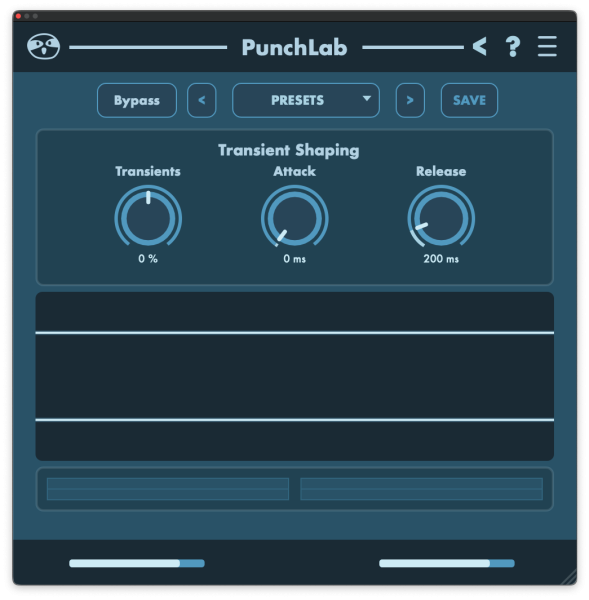
PunchLab is a free transient designer by SoundSloth that makes drums and loops hit harder in seconds. Add attack for snap and definition, or shape sustain to tighten tails and remove unwanted ring—without reaching for heavy EQ or compression. Perfect for kick, snare, drum bus, bass plucks, guitars, and synth stabs. Free download. Instant punch.

introducing

PunchLab is a free transient designer by SoundSloth that makes drums and loops hit harder in seconds. Add attack for snap and definition, or shape sustain to tighten tails and remove unwanted ring—without reaching for heavy EQ or compression. Perfect for kick, snare, drum bus, bass plucks, guitars, and synth stabs. Free download. Instant punch.

Product is still in beta, if you encounter any problems, please contact us.

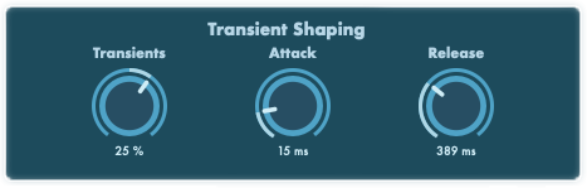
This is the main control section of PunchLab. It contains the three parameters that define how the transient designer reacts to your audio: – Transients (%) Sets the overall intensity of the transient shaping. Higher values push hits forward and increase perceived punch/impact. – Attack (ms) Controls how fast PunchLab reacts to the initial hit. Lower Attack = sharper, snappier transients (more “click” / bite). Higher Attack = smoother response (less aggressive, more natural). – Release (ms) Controls how quickly PunchLab lets go after the initial hit. Lower Release = tighter, shorter effect (less tail / ring). Higher Release = longer hold (more body / sustain shaping, more “grab”).
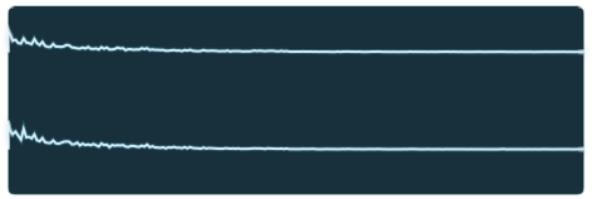
This panel is your real-time visual monitor. It shows the waveform so you can *see* what PunchLab is doing while you adjust the controls. How to use it: – Turn Bypass on/off and watch the change in the waveform shape. – When you raise Transients, you’ll typically see more emphasis on the first peaks of each hit. – Attack and Release change how “wide” and “fast” the transient shaping reacts—use the waveform to avoid over-sharpening or flattening. Tip: Use the waveform panel as a sanity check: if you’re seeing huge peak spikes, you may be overdriving the transients. If the waveform looks almost unchanged but it sounds better, that’s perfect—PunchLab is meant to be subtle and musical, not visually extreme.

HEAR IT IN ACTION..

album-art

    Ready to Use This Plugin in Your Next Track?

    Get instant access to this Sound Sloth plugin and start adding movement,
    groove, and character to your productions today.

    Quick compatibility

    Formats:

    VST3, AU

    OS Support

    Windows, macOS

    Latency

    Zero

    CPU Usage

    Low

    Licence

    No iLok

    Price type

    Need help installing?

    If your plugin does not show up, or macOS blocks it, here’s what to do:

    If macOS blocks the plugin, right click the installer or plugin file and choose Open, then confirm Open again. If you still do not see it in your DAW, rescan plugins and make sure you installed the correct format, AU for Logic, VST3 for most other DAWs.

    Run the installer as admin if needed, then check your VST3 folder path in your DAW. If the plugin does not show up, restart the DAW and run a plugin rescan, then confirm you installed to the same folder your DAW scans.

    First restart your DAW and run a full plugin rescan. Then confirm you installed the right format and location, AU for Logic, VST3 for most other DAWs, and check the folder your DAW is scanning. On macOS, open the plugin once via right click, Open if Gatekeeper blocked it. On Windows, run the installer as admin and verify the VST3 path matches your DAW settings.

    Global FAQ | /faq/
    Is PunchLab really free?
    Yes, PunchLab is a free download.
    Which formats are included?
    Which DAWs work with it?
    Any DAW that supports VST3 or AU. Logic uses AU.

    Your download links are on your download page, and the newest version is always posted there. If you lost access, contact support with your order email and we will re-enable your download. If a file looks corrupted or the plugin will not install, delete the old download, grab a fresh copy, then install again.

    Start with small attack moves, then level match using output.Use Mix to blend until it feels like an upgrade, not an effect.Try it on drum bus for quick punch without compression.

    WELCOME TO SOUND SLOTH. GET 50% OFF WITH BETA2026 AT CHECKOUT.